Benchmarking Kafka + WebSocket System
2024-06-07
|
5 mins to read
|
Share article
TLDR;
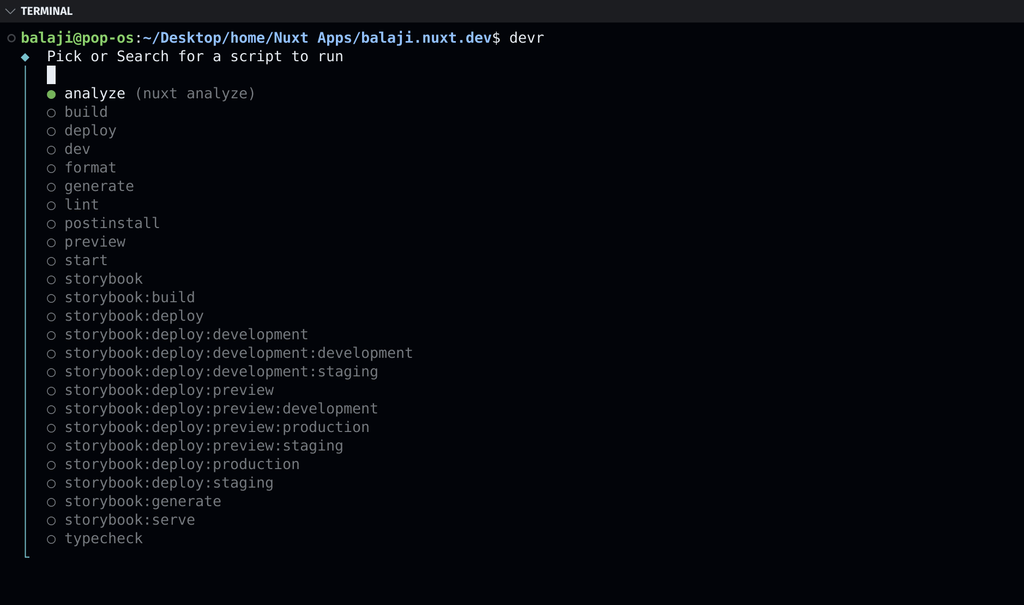
Running or starting scripts in a large JS/TS codebase is difficult for me, especially when you have numerous scripts defined in your package.json file. To streamline this process, I created Dev Runner, a simple interactive command-line interface tool built in Rust that detects package.json files and provides an interactive prompt to run npm scripts easily.


Reason ❓
In my development journey, I often found myself repeatedly typing out long npm scripts or having to look up script names in the package.json file. Although I have bash aliases for some of the scripts, it wasn't enough. Things were getting out of hand. Setting different aliases for different projects wasn't a good idea. I ended up with a lot of aliases in my bashrc file, and I sometimes forgot what aliases I had set.
📈 Solution 🙂
Automate the detection of package.json: No more manually searching for the file.
List all available npm scripts: Get a quick overview of all scripts without opening the package.json.
Provide an interactive prompt: Select and run scripts with ease, saving time and reducing errors.
Query scripts from terminal: Quickly search for scripts by name or command.